Small SAP Talk. A Native Way to Monitor an External API on iOS
Small SAP Talk.A Native Way to Monitor an External API on iOS
If you’ve never heard of a tool called Scriptable, you may be overlooking a surprisingly powerful way to extend your developer workflow directly onto your iPhone.
Scriptable opens the door to lightweight automation scenarios that blend JavaScript with native iOS capabilities — widgets, notifications, files, and HTTP requests — all without building a full mobile application.
What's Scriptable?
Scriptable is an iOS application that allows you to write and execute JavaScript code on your device and integrate it with native iOS features.
With it, you can:
- Create custom home screen widgets
- Trigger REST API calls
- Display dynamic data
- Automate small daily tasks
More details:
See: https://scriptable.app/
Why should a developer care?
In a world filled with cloud services, APIs, and distributed systems, developers constantly switch between dashboards, consoles, and monitoring tools. Sometimes, however, you just want a quick glance at your phone.
No logins. No cockpit navigation. No CLI commands.
Just status.
Scenario
Let’s assume we have an application deployed to the Cloud Foundry environment of an SAP BTP account.
See Note Deploying JAVA Spring Boot Application to the SAP BTP Cloud Foundry Instance
For demonstration purposes, I created a small 'Hello World' style application.
const express = require("express");
const app = express();

const port = process.env.PORT || 3000;

app.get("/", (req, res) => {
  console.log(`Request received at ${new Date().toISOString()}`);
  res.send("Demo-1 app is running");
});

app.get("/status", (req, res) => {
  res.json({
    status: "UP",
    ts: new Date().toISOString(),
  });
});

app.listen(port, () => {
  console.log(`App started on port ${port}`);
});
After deploying the application to Cloud Foundry, its endpoints can be triggered as shown below.
The problem
Even for a small service, it is natural to ask:
- Is the app running?
- Is the endpoint reachable?
- Did anything break?
Opening the BTP Cockpit works, but it’s hardly the fastest method when you’re away from your laptop. Instead of building a native iOS monitoring app, we can use Scriptable to create a compact widget that:
- Calls the application’s
/statusendpoint - Evaluates the response
- Displays the current status
And thanks to modern AI tools, generating such a script is almost effortless. Describe what you want and...
Seconds later — working code.
const APP_URL = "https://YOUR-URL-TO-THE-APP/"


const TIMEOUT_MS = 4000;

async function fetchStatus() {
  const req = new Request(APP_URL);
  req.timeoutInterval = TIMEOUT_MS;
  req.method = "GET";
  req.headers = { "Accept": "application/json" };

  try {
    const res = await req.loadJSON();
    return { ok: true, data: res };
  } catch (e) {
    return { ok: false, err: String(e) };
  }
}

function buildWidget(title, statusLine, detailLine, ok) {
  const w = new ListWidget();
  w.setPadding(14, 14, 14, 14);

  const t = w.addText(title);
  t.font = Font.semiboldSystemFont(14);

  w.addSpacer(10);

  const s = w.addText(statusLine);
  s.font = Font.boldSystemFont(24);

  w.addSpacer(6);

  const d = w.addText(detailLine);
  d.font = Font.systemFont(12);
  d.textOpacity = 0.8;

  w.backgroundColor = ok ? new Color("1c3d1c") : new Color("3d1c1c");

  return w;
}

const check = await fetchStatus();
const now = new Date();
const timeStr = now.toLocaleTimeString([], { hour: "2-digit", minute: "2-digit" });

let widget;
if (check.ok) {
  const status = (check.data.status || "UP").toString();
  widget = buildWidget(
    "DemoApp-1 Status",
    status,
    `Last check: ${timeStr}`,
    true
  );
} else {
  widget = buildWidget(
    "DemoApp-1 Status",
    "DOWN",
    `Last check: ${timeStr}`,
    false
  );
}

if (config.runsInWidget) {
  Script.setWidget(widget);
} else {
  await widget.presentSmall();
}

Script.complete();
Final step
Add a Scriptable widget to your home screen.
Now your iPhone becomes a minimal monitoring console:
- App UP = Calm developer
- App DOWN = Time to work hard
The widget refreshes periodically and provides passive visibility into your application’s health.
Next step is to add a widget of the Scriptable type on your screen, which will be pleasing your eyes, ears and brain. Depending on the status of your app, the widget will be changing its status accordingly.
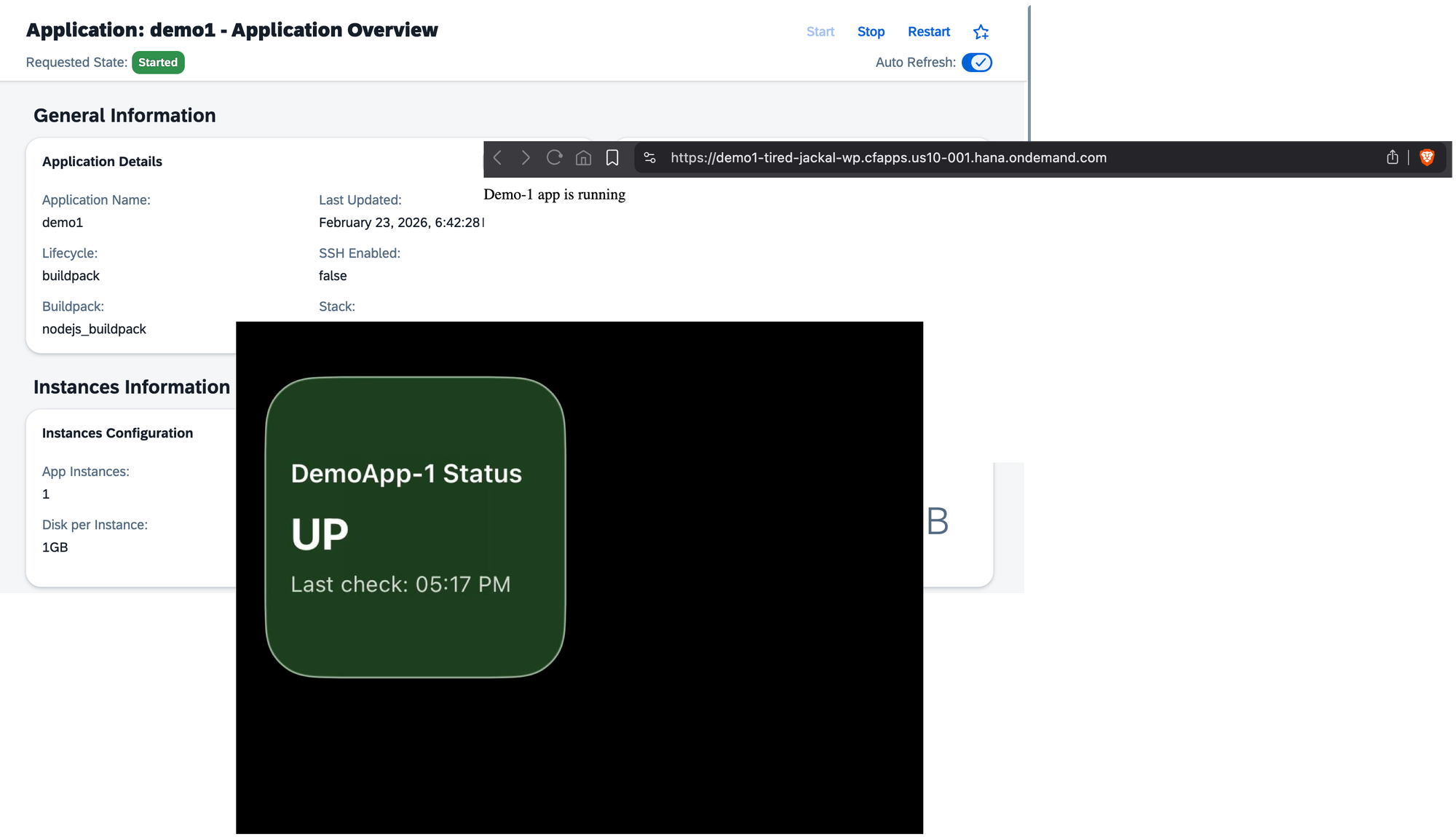
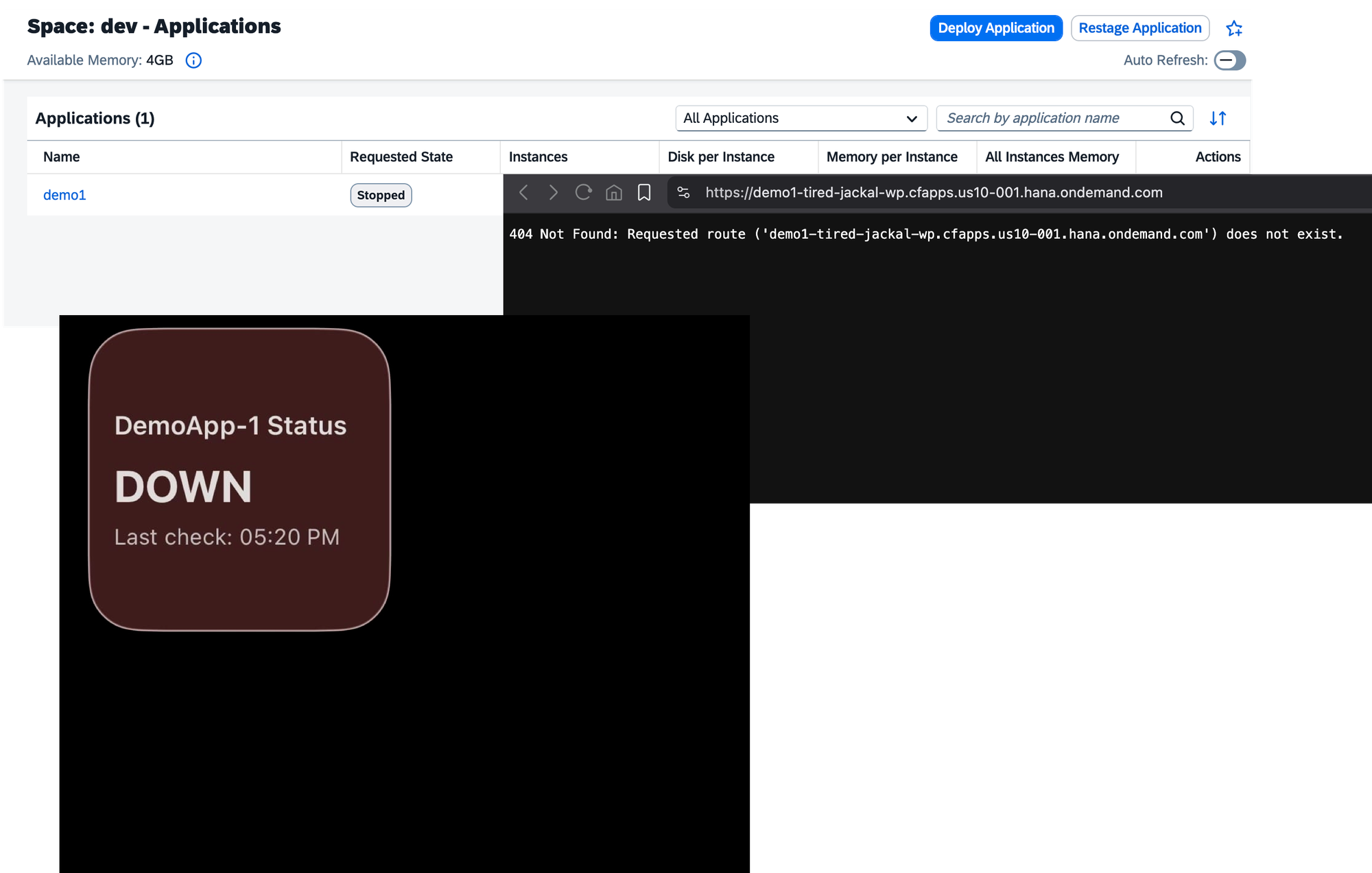
Keep an eye on your services, enjoy the elegance of small automations, and keep shining.
P.S.
The idea for this note came from a discussion with Oleg — many thanks for the inspiration.
For more information about the "Small SAP Talk" series, refer to the following note:
See: Small SAP Talk